
Home | Services | Prices | Covered Area | Contact Us

A hard-disk failure occurs when a hard disk drive malfunctions and the stored information cannot be accessed with a properly
configured computer. A disk failure may occur in the course of normal operation, or due to an external factor such as exposure to fire or water or high magnetic waves,
or suffering a sharp impact or environmental contamination, which can lead to a head crash. Windows has a built in Disk Checking tool called “chkdsk.exe”
which can sometimes repair problems related to bad sectors, lost clusters, cross-linked files, and directory errors.
To use this feature Select the volume that you want to check and then right Click on the Volume and then select Properties
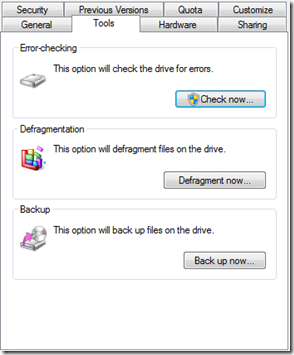
Select “Check Now” option and then Start
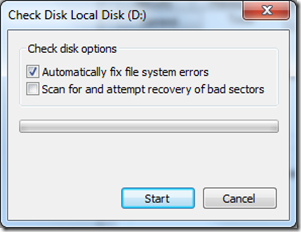
Before you start with this process make sure that all files and folders in this volume are not in use because Disk checking requires exclusive access to the Disk
For large volumes with errors this may take a long time and your computer may restart to complete this process.
|
Our policy : No fix, No Solutions, No charge. No hourly fees. We charge a single flat rate for any computer repair. 100% satisfaction guaranteed. |
We offer onsite computer repair service in Los Angeles area 7 days a week, Call us anytime !!!!
Computer Repair Services Los Angeles: Los
Angeles Computer Repair Service -- Los Angeles
Laptop Repair service -- Los Angeles Computer
Virus Removal -- Laptop LCD Screen Replacement
Laptop Keyboard Replacement -- Los
Angeles Data Recovery--Los Angeles PC Complete
Tune Up -- Laptop DC IN Jack Repair
Most popular Articles : How to avoid Viruses -- What is Spyware ? -- How to properly uninstall a program in your computer ? -- Should I buy a laptop or desktop computer ?
How drivers work on my computer ? -- How to check my computer hard drive for errors -- Erase your hard drive before disposing your old computer
What is a computer's RAM ?-- How to change your screen resolution -- When Should I turn off my computer ? -- My Computer is not booting up. What can I do ?
How to burn a CD/DVD in WIN 7 ? -- Run vs Save when downloading a program -- How to delete history and temporary internet files -- Be very careful with email attachments
The Compucare Computer Repair Services Los Angeles - Resources
The Compucare support@thecompucare.com 323-309-2784 |
Computer repair Los Angeles, Computer repair service Los Angeles, Computer repair technician Los angeles, onsite computer repair Los angeles, computer repair services los angeles, Computer repair shop Los Angeles, PC Repair Los Angeles, Los Angeles Laptop Repair, Los Angeles Laptop Service, la computer repair, mobile computer repair, computer repairs los angeles, it support los angeles |
Computer repair Los Angeles, Computer repair service Los Angeles, Computer repair technician Los angeles, onsite computer repair Los angeles, computer repair services los angeles, Computer repair shop
Los Angeles, PC Repair Los Angeles, Los Angeles Laptop Repair, Los Angeles Laptop Service, la computer repair, mobile computer repair, computer repairs los angeles, it support los angeles
ZipCodes :90001,90002,90003,90004,90005,90006,90007,90008,90009,90010,90011,90012,90013,90014,90015,90016,90017,90018,90019,90020,90021,90022,90023,90024,90025,90026,90027,90028,90029,90030,90031,90032,90033,90034,90035,90036,90037,90038,90039,90040,
90041,90042,90043,90044,90045,90046,90047,90048,90049,90050,90051,90052,90053,90054,90055,90056,90057,90058,90059,90060,90071,90072,90073,90074,90075,90076,90077,90078,90079,90080,90081,90082,90083,90084,90086,90087,90088,90089,
90091,90093,90094,90095,90096,90099,90101,90103,90189,90230,91331,91335,90009,90009