Home | Services | Prices | Covered Area | Contact Us

Spyware is a type of malware, or malicious software designed to infiltrate a
computer system without the owner's consent. Once installed, the spyware starts
working
and performs tasks that it was designed to do such as collecting little bits of information at a time about users without their knowledge.
Again, malware is an expression, or a general term used by computer professionals to mean a variety of forms of hostile, intrusive, or annoying software or program code.
The term "computer virus" is sometimes used as a catch-all phrase to include all types of malware, including true viruses.
Spyware can interfere with user control of the computer in other ways, such as installing additional software and redirecting Web browser activity.
Spyware is also known to change computer settings, resulting in slow connection speeds, different home pages, and/or loss of Internet or functionality of other programs.
The presence of spyware is typically hidden from the user, and can be difficult to detect. Typically, spyware is secretly installed on the user's personal computer.
Sometimes, however, spywares such as keyloggers are installed by the owner of a shared, corporate, or public computer on purpose in order to secretly monitor other users.
History Of Spyware
The first recorded use of the term "spyware" occurred on October 16,
1995 in a Usenet post that poked fun at Microsoft's business model. Spyware
at first denoted software meant for espionage purposes.
However, in early 2000 the founder of Zone Labs, Gregor Freund, used the term in a press release for the ZoneAlarm Personal Firewall. Since then, "spyware" has taken on its present sense.
What Is The Difference Between Spyware, Adware and Tracking?
ADWARE - or advertising-supported software, is any software which, once installed,
will automatically plays, displays, or downloads advertisements to a user's
pc after the
software is installed on it or while the application is being used. Some types of adware are also spyware and can be classified as privacy-invasive software.
TRACKING - At Computer Repair of Reading, we call them 'trackware'. Trackware (fall under Spyware) are suspicious programs that tracks
user's web browsing then the data is used for 'targeted' advertisement impressions. Some observers even go as far as describing Alexa Toolbar,
which is in Internet Explorer plug-in, published by Amazon.com, as spyware and some anti-spyware software will report it as such and remove them.
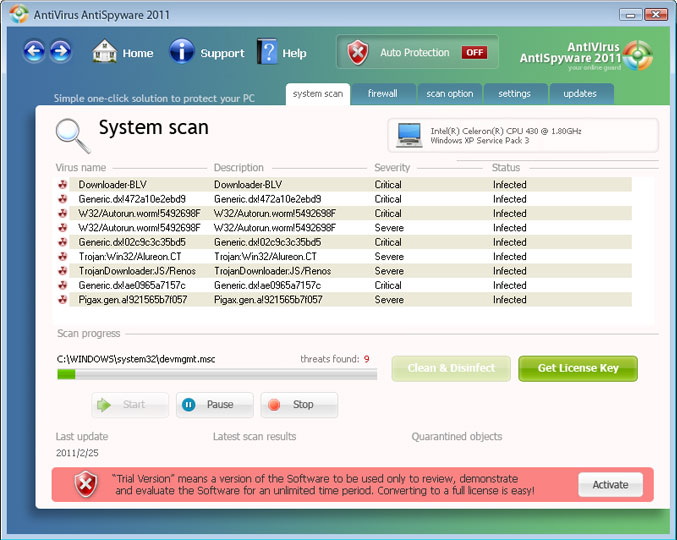
Fake Antispyware Screenshot :
How is a PC Infected with Spyware?
Spyware are not like viruses or worms, therefore, they do not spread in the same way as a virus would. Spyware do not transmit the infection to
her PCs but they do get installed through deception of the user, or exploitation of software vulnerabilities.
Now, when we say 'through deception of the user', we meant that most spyware are installed without users' knowledge because a user
will not install a software that he know is bad or might disrupt work and compromise their privacy and infect their computer.
Spyware can also come bundled with other software. The user downloads a program and installs it, and the installer
additionally installs the spyware. Although the desirable software itself may do no harm, the bundled spyware does. In some cases, spyware authors
have paid shareware authors to bundle spyware with their software. In other cases, spyware authors have repackaged desirable freeware with installers that slipstream spyware.
Some spyware authors infect a system through security holes in the Web browser or in other software. When the user navigates to a Web
page controlled by the spyware author, the page contains code which attacks the browser and forces the download and installation of spyware.
The spyware author would also have some extensive knowledge of commercially-available anti-virus and firewall software. This has become known as
a "drive-by download", which leaves the user a hapless bystander to the attack.
|
Our policy : No fix, No Solutions, No charge. No hourly fees. We charge a single flat rate for any computer repair. 100% satisfaction guaranteed. |
Spyware Removal Tools
In response to the emergence of spyware, a small industry has sprung up dealing in anti-spyware software. Running anti-spyware software has become a
widely recognized element of computer security practices for computers, especially those running Microsoft Windows.
A number of jurisdictions have passed anti-spyware laws, which usually target any software that is surreptitiously installed to control a user's computer.
Because spyware threat has worsened, a number of techniques have emerged to counteract it. These programs are designed to block or remove the infection. Spyware remains
a costly problem because when a large number of pieces of spyware have infected a computer, the only solution, most of the time,
is to actualy backup user's data onto an external media and re-install windows and all other applications because some version of spyware, such as some versions of Vundo,
cannot be completely removed by Symantec, Microsoft, PC Tools, and others because it infects rootkit,
Internet Explorer, and Windows' lsass.exe (Local Security Authority
Subsystem Service) with a randomly-filenamed dll (dynamic link library).
.
Many programmers and commercial firms have released products specially for blocking
or removing spyware. Below is a list of Anti-Spyware software that we have tested
and used for years.
Just because one anti spyware software is rated the best today, it does not mean that it will still be rated the best next year, so, you have keep watching anti-spyware software reviews available online.
Antispyware software recommended by Compucare:
Spybot Search & Destroy
Malwarebytes Anti Malware
SuperAntiSpyware Professional
Ad-Aware Pro
Microsoft Security essentials
TIP: Spyware, like we previously mentioned, are not like viruses
in that you can have 2 Anti-Spyware software installed on one single computer
and not worry about any conflict contrary to trying to install 2 anti virus software on one machine. Compucare recommend to at least have 2 anti-spyware software
installed for one might catch one type of malware and the other catch another type.
In Conclusion
If you want to protect your desktop or laptop pc or yourself, we recommend that
you install 2 Anti-Spyware Software and one Anti-Virus and always make sure
that they are kept up to date.
We offer onsite computer repair service in Los Angeles area 7 days a week, Call us anytime !!!!
Computer Repair Services Los Angeles: Los
Angeles Computer Repair Service -- Los Angeles
Laptop Repair service -- Los Angeles Computer
Virus Removal -- Laptop LCD Screen Replacement
Laptop Keyboard Replacement -- Los
Angeles Data Recovery--Los Angeles PC Complete
Tune Up -- Laptop DC IN Jack Repair
Most popular Articles : How to avoid Viruses -- What is Spyware ? -- How to properly uninstall a program in your computer ? -- Should I buy a laptop or desktop computer ?
How drivers work on my computer ? -- How to check my computer hard drive for errors -- Erase your hard drive before disposing your old computer
What is a computer's RAM ?-- How to change your screen resolution -- When Should I turn off my computer ? -- My Computer is not booting up. What can I do ?
How to burn a CD/DVD in WIN 7 ? -- Run vs Save when downloading a program -- How to delete history and temporary internet files -- Be very careful with email attachments
The Compucare Computer Repair Services Los Angeles - Resources
The Compucare support@thecompucare.com 323-309-2784 |
Computer repair Los Angeles, Computer repair service Los Angeles, Computer repair technician Los angeles, onsite computer repair Los angeles, computer repair services los angeles, Computer repair shop Los Angeles, PC Repair Los Angeles, Los Angeles Laptop Repair, Los Angeles Laptop Service, la computer repair, mobile computer repair, computer repairs los angeles, it support los angeles |
Computer repair Los Angeles, Computer repair service Los Angeles, Computer repair technician Los angeles, onsite computer repair Los angeles, computer repair services los angeles, Computer repair shop
Los Angeles, PC Repair Los Angeles, Los Angeles Laptop Repair, Los Angeles Laptop Service, la computer repair, mobile computer repair, computer repairs los angeles, it support los angeles
ZipCodes :90001,90002,90003,90004,90005,90006,90007,90008,90009,90010,90011,90012,90013,90014,90015,90016,90017,90018,90019,90020,90021,90022,90023,90024,90025,90026,90027,90028,90029,90030,90031,90032,90033,90034,90035,90036,90037,90038,90039,90040,
90041,90042,90043,90044,90045,90046,90047,90048,90049,90050,90051,90052,90053,90054,90055,90056,90057,90058,90059,90060,90071,90072,90073,90074,90075,90076,90077,90078,90079,90080,90081,90082,90083,90084,90086,90087,90088,90089,
90091,90093,90094,90095,90096,90099,90101,90103,90189,90230,91331,91335,90009,90009