
Home | Services | Prices | Covered Area | Contact Us

Random access memory, usually known by its acronym RAM, is basically the short-term storage area for a computer’s data.
If a human were a computer, the RAM would be comparable to the portion of the brain that handles one’s short-term
memory while the computer’s hard drive is likened to a person’s long-term memory.
RAM is the place within the computer that the operating system, any programs, and any data that is currently in use is stored so that they can quickly be
accessed by the computer’s central processing unit (CPU).
Reading bits of data from the RAM is far faster for the computer than retrieving information from the hard drive, floppy drives, or CD-ROM drives.
This type of memory may be accessed at random, meaning any byte of data is able to be accessed at any time without the need for using the preceding bytes to refer
to first. Besides computers, RAM may also be found in other electronics such as printers.
RAM is also sometimes referred to as the computer’s “main memory” or “volatile memory” because unlike other forms of memory and data storage,
when the PC is turned off or powered down, the data stored within RAM is lost. Unlike the hard drive’s memory or capacity, RAM will never run
out of room or memory, but will keep operating, just at a slower rate until it is refreshed, or the computer is rebooted.
|
Our policy : No fix, No Solutions, No charge. No hourly fees. We charge a single flat rate for any computer repair. 100% satisfaction guaranteed. |
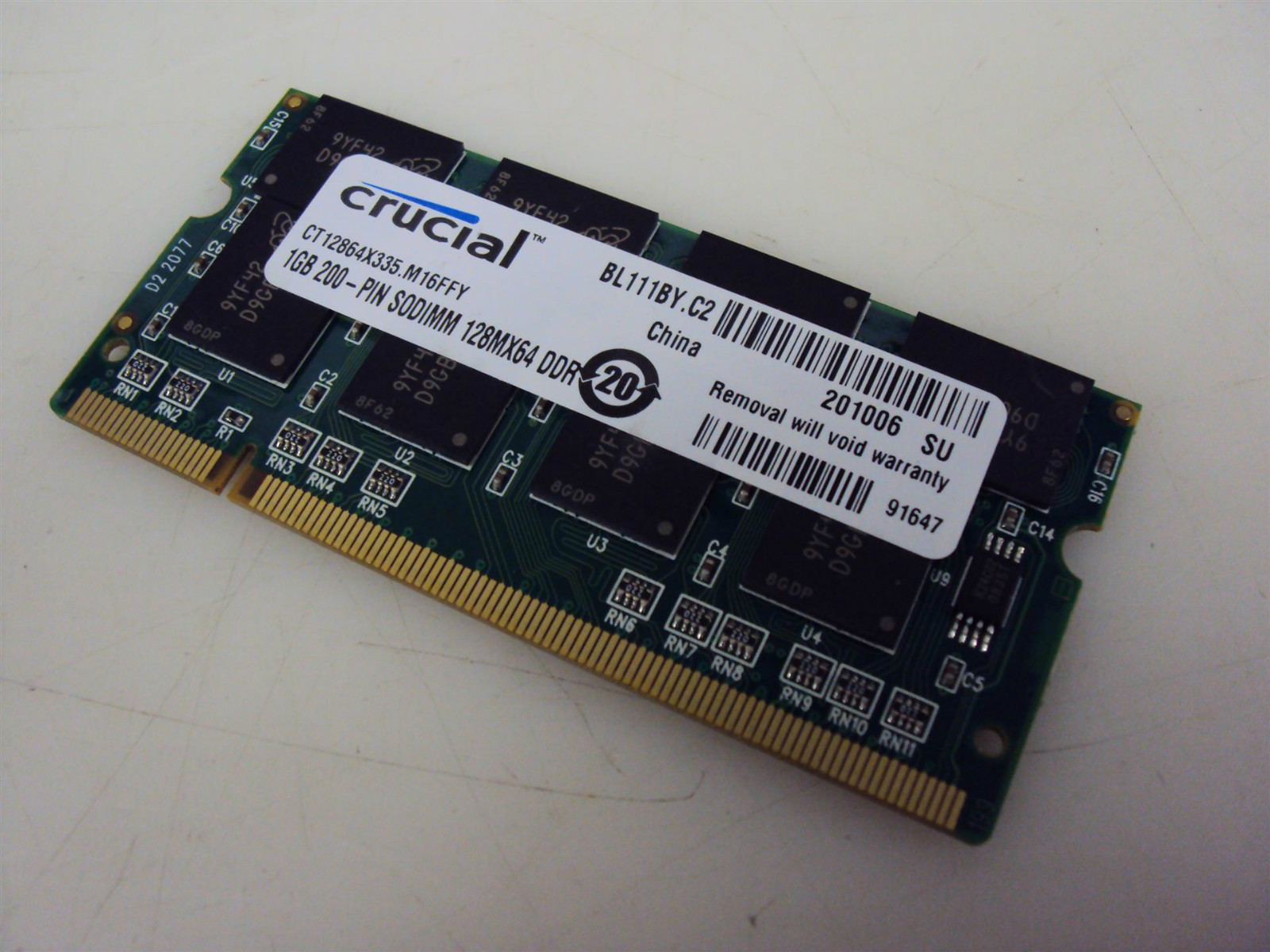
What does RAM look like?
With the majority of personal computers, RAM is not a built-in part of the motherboard,
but rather is in the form of modules known as RAM or memory sticks, which are
approximately the size of a few sticks of chewing gum. RAM is easily removed and replaced if they are damaged for some reason or if there’s the need for more memory.
Basic Types of RAM
There are two basic types of random access memory, dynamic RAM (DRAM) and static
RAM (SRAM). Besides the way they hold a computer’s data and how often
they need
to be refreshed, SRAM is faster than the more common DRAM, but also more expensive. With both types of RAM, once the computer is turned off or restarted,
the data stored is lost and the memory is then refreshed. This is why computers must be rebooted periodically to free up RAM and help them to run faster.
There is another type of random access memory which is integrated within the computer’s CPU and is referred to as “cache memory” instead of RAM.
Most PCs will have slots to add more modules of RAM to help the computer process data faster.
Measuring the Speed of RAM
Access time is the term used to describe how fast RAM writes and reads data
once it has received the request or command from the computer’s central
processing unit.
Access time is measured using nanoseconds, and the smaller the number, the faster the RAM will be able to process data.
Much like a computer’s CPU, RAM is measured using megahertz
(MHz) or gigahertz (GHz). The higher the amount of MHz or GHz, the faster the
speed of the RAM will be.
We offer onsite computer repair service in Los Angeles area 7 days a week, Call us anytime !!!!
Computer Repair Services Los Angeles: Los
Angeles Computer Repair Service -- Los Angeles
Laptop Repair service -- Los Angeles Computer
Virus Removal -- Laptop LCD Screen Replacement
Laptop Keyboard Replacement -- Los
Angeles Data Recovery--Los Angeles PC Complete
Tune Up -- Laptop DC IN Jack Repair
Most popular Articles : How to avoid Viruses -- What is Spyware ? -- How to properly uninstall a program in your computer ? -- Should I buy a laptop or desktop computer ?
How drivers work on my computer ? -- How to check my computer hard drive for errors -- Erase your hard drive before disposing your old computer
What is a computer's RAM ?-- How to change your screen resolution -- When Should I turn off my computer ? -- My Computer is not booting up. What can I do ?
How to burn a CD/DVD in WIN 7 ? -- Run vs Save when downloading a program -- How to delete history and temporary internet files -- Be very careful with email attachments
The Compucare Computer Repair Services Los Angeles - Resources
The Compucare support@thecompucare.com 323-309-2784 |
Computer repair Los Angeles, Computer repair service Los Angeles, Computer repair technician Los angeles, onsite computer repair Los angeles, computer repair services los angeles, Computer repair shop Los Angeles, PC Repair Los Angeles, Los Angeles Laptop Repair, Los Angeles Laptop Service, la computer repair, mobile computer repair, computer repairs los angeles, it support los angeles |
Computer repair Los Angeles, Computer repair service Los Angeles, Computer repair technician Los angeles, onsite computer repair Los angeles, computer repair services los angeles, Computer repair shop
Los Angeles, PC Repair Los Angeles, Los Angeles Laptop Repair, Los Angeles Laptop Service, la computer repair, mobile computer repair, computer repairs los angeles, it support los angeles
ZipCodes :90001,90002,90003,90004,90005,90006,90007,90008,90009,90010,90011,90012,90013,90014,90015,90016,90017,90018,90019,90020,90021,90022,90023,90024,90025,90026,90027,90028,90029,90030,90031,90032,90033,90034,90035,90036,90037,90038,90039,90040,
90041,90042,90043,90044,90045,90046,90047,90048,90049,90050,90051,90052,90053,90054,90055,90056,90057,90058,90059,90060,90071,90072,90073,90074,90075,90076,90077,90078,90079,90080,90081,90082,90083,90084,90086,90087,90088,90089,
90091,90093,90094,90095,90096,90099,90101,90103,90189,90230,91331,91335,90009,90009